Windows 보안 로그의 이벤트 4625는 로그온에 실패했다는 기록입니다. 건수만 보면 공격처럼 보이지만, 비밀번호를 잘못 친 사람인지 원격에서 계정 이름을 바꿔 가며 찍어 보는 시도인지는 기록 안의 항목을 읽어야 구분됩니다. 이 글에서는 Windows 11에서 일부러 무해한 실패를 만들고, PowerShell 스크립트로 집계해 LOCAL ONLY와 REVIEW 두 판정이 모두 나오게 한 다음, 이벤트 뷰어와 대조합니다. 그리고 계정 잠금 임계값을 낮춰 실제로 계정이 잠기는 것까지 확인하고 설정을 되돌립니다.
이 실습은 임시 계정을 만들고 계정 잠금 정책을 바꿉니다. 잠금 임계값을 낮추면 정상 사용자도 비밀번호를 몇 번 틀리는 것만으로 잠길 수 있으므로, 업무용 PC에서는 정책 담당자와 협의한 뒤 진행합니다. 임시 계정과 변경한 정책은 마지막 단계에서 되돌립니다.
준비물
| 항목 | 확인한 값 |
|---|---|
| 운영체제 | Windows 11, 표시 언어 한국어 |
| PowerShell | 관리자 PowerShell (Windows PowerShell 5.1). Security 로그는 관리자만 읽습니다 |
| 감사 정책 | 로그온 감사가 Success and Failure여야 4625가 남습니다 |
| 임시 계정 | cr-test. 글에 나오는 비밀번호는 실습용으로 만든 값이며 실제 비밀번호가 아닙니다 |
감사 정책은 다음으로 확인합니다. Windows 11의 기본값은 Success and Failure입니다.
auditpol /get /subcategory:"Logon"
1. 발견: 4625에서 무엇을 읽을지 정하기
4625 한 건에는 판단에 쓸 항목이 들어 있습니다. 이 글의 스크립트는 다음 다섯 가지를 봅니다.
| 항목 | 의미 |
|---|---|
| 로그온 유형 | 2는 키보드로 하는 로컬 로그온, 3은 네트워크, 10은 원격 데스크톱입니다 |
| 하위 상태 | 0xc000006a는 비밀번호 틀림, 0xc0000064는 없는 계정, 0xc0000234는 잠긴 계정입니다 |
| 원본 네트워크 주소 | 원격에서 왔다면 출발지 주소가 남습니다. 로컬 로그온은 -입니다 |
| 호출자 프로세스 이름 | 요청한 프로세스입니다. 네트워크 로그온은 보통 비어 있습니다 |
| 계정 이름 | 한 계정만 반복되는지, 여러 이름을 바꿔 가는지 봅니다 |
판정은 단순합니다. 원격 유형(3, 8, 10)이 있거나, 출발지 주소가 있거나, 5개 이상의 계정 이름이 나오거나, 없는 계정이 있으면 REVIEW, 모두 아니면 LOCAL ONLY입니다.
2. 분석 스크립트와 이벤트 뷰어 보기
Get-FailedLogons.ps1은 Get-WinEvent로 4625를 읽어 집계만 하고 아무것도 바꾸지 않습니다. 계정 이름은 첫 글자만 보여 주며, -ShowAccounts를 주면 전체를 보여 줍니다. 문구는 영문으로만 썼습니다. Windows PowerShell 5.1은 BOM이 없는 파일의 한글을 깨뜨리기 때문입니다.
# Read-only analysis of failed logons (Security event 4625). It changes nothing.
# Usage (elevated PowerShell):
#   powershell -NoProfile -ExecutionPolicy Bypass -File .\Get-FailedLogons.ps1 -Minutes 60 [-ShowAccounts]
param([int]$Minutes = 10080, [switch]$ShowAccounts)

[Console]::OutputEncoding = [System.Text.Encoding]::UTF8

$logonTypes = @{ "2"="Interactive (local)"; "3"="Network"; "5"="Service"; "7"="Unlock"; "8"="NetworkCleartext"; "10"="RemoteInteractive (RDP)" }
$subStatus  = @{ "0xc000006a"="Wrong password"; "0xc0000064"="User does not exist"; "0xc000006d"="Bad user name or auth info";
                 "0xc0000234"="Account locked out"; "0xc0000072"="Account disabled" }

function Mask($name) {
    if ($ShowAccounts -or [string]::IsNullOrEmpty($name)) { return $name }
    return ($name.Substring(0, 1) + "***")
}

$start = (Get-Date).AddMinutes(-$Minutes)
try {
    $events = Get-WinEvent -FilterHashtable @{ LogName = "Security"; Id = 4625; StartTime = $start } -ErrorAction Stop
} catch {
    if ($_.Exception.Message -like "*No events were found*") { Write-Output "No 4625 events in the last $Minutes minutes."; exit 0 }
    Write-Output "Cannot read the Security log. Run in an elevated PowerShell."; exit 1
}

$rows = foreach ($ev in $events) {
    $x = [xml]$ev.ToXml(); $d = @{}
    foreach ($n in $x.Event.EventData.Data) { $d[$n.Name] = $n.'#text' }
    $sub = "$($d.SubStatus)".ToLower()
    [pscustomobject]@{
        Time    = $ev.TimeCreated
        User    = $d.TargetUserName
        Type    = $d.LogonType
        TypeTxt = $(if ($logonTypes[$d.LogonType]) { $logonTypes[$d.LogonType] } else { "Type $($d.LogonType)" })
        Reason  = $(if ($subStatus[$sub]) { $subStatus[$sub] } else { $sub })
        Ip      = $(if ($d.IpAddress -and $d.IpAddress -ne "-") { $d.IpAddress } else { "(none)" })
        Process = $(if ($d.ProcessName -and $d.ProcessName -ne "-") { Split-Path $d.ProcessName -Leaf } else { "(none)" })
    }
}

$total   = @($rows).Count
$remote  = @($rows | Where-Object { $_.Type -in @("3", "8", "10") }).Count
$ips     = @($rows | Where-Object { $_.Ip -ne "(none)" } | Select-Object -ExpandProperty Ip -Unique).Count
$users   = @($rows | Select-Object -ExpandProperty User -Unique).Count
$locked  = @($rows | Where-Object { $_.Reason -eq "Account locked out" }).Count
$unknown = @($rows | Where-Object { $_.Reason -in @("User does not exist", "Bad user name or auth info") }).Count

$byType = $rows | Group-Object TypeTxt | Sort-Object Count -Descending
$byWhy  = $rows | Group-Object Reason | Sort-Object Count -Descending
$byUser = $rows | Group-Object User | Sort-Object Count -Descending | Select-Object -First 5
$byProc = $rows | Group-Object Process | Sort-Object Count -Descending | Select-Object -First 5
$byIp   = $rows | Group-Object Ip | Sort-Object Count -Descending | Select-Object -First 5

$signals = New-Object System.Collections.Generic.List[string]
if ($remote -gt 0)  { $signals.Add("REMOTE: $remote failures came over the network or RDP (type 3, 8, 10).") }
if ($ips -ge 1)     { $signals.Add("SOURCES: $ips distinct source IP address(es) appear in the events.") }
if ($users -ge 5)   { $signals.Add("SPRAY: $users different account names were tried.") }
if ($unknown -gt 0) { $signals.Add("GUESSING: $unknown failures used names that do not exist.") }
if ($locked -gt 0)  { $signals.Add("LOCKOUT: $locked failures hit a locked account.") }
$verdict = if ($remote -gt 0 -or $ips -ge 1 -or $users -ge 5 -or $unknown -gt 0) { "REVIEW: signs of remote or guessing activity" }
           else { "LOCAL ONLY: no remote source, one or few accounts, known account names" }

function Show($title, $groups, [bool]$maskKey = $false) {
    Write-Output ""; Write-Output "== $title"
    foreach ($g in $groups) {
        $k = if ($maskKey) { Mask $g.Name } else { $g.Name }
        Write-Output ("{0,6}  {1}" -f $g.Count, $k)
    }
}

Write-Output "Failed logons (4625) in the last $Minutes minutes: $total"
Show "By logon type" $byType
Show "By reason" $byWhy
Show "By account" $byUser $true
Show "By source IP" $byIp
Show "By process" $byProc
Write-Output ""
Write-Output "== Signals"
if ($signals.Count -eq 0) { Write-Output "  (none)" } else { $signals | ForEach-Object { Write-Output "  $_" } }
Write-Output ""
Write-Output "Verdict: $verdict"
같은 4625만 모아 보는 이벤트 뷰어 사용자 지정 보기 파일도 있습니다.
<ViewerConfig><QueryConfig><QueryParams><UserQuery /></QueryParams><QueryNode><Name>Failed logons 4625</Name><QueryList><Query Id="0" Path="Security"><Select Path="Security">*[System[(EventID=4625)]]</Select></Query></QueryList></QueryNode></QueryConfig></ViewerConfig>
eventvwr.msc /v:C:\audit-check\failed-logon-view.xml
3. 무해한 실패 만들기
New-TestFailedLogons.ps1은 임시 계정 cr-test를 만들고 세 종류의 실패를 만듭니다. 로컬 로그온 실패(유형 2)는 LogonUser를 틀린 비밀번호로 부르고, 네트워크 실패(유형 3)는 net use \\localhost\IPC$에 틀린 비밀번호를 주고, 세 번째는 존재하지 않는 계정으로 같은 명령을 씁니다. 실패 횟수는 잠금 임계값(10) 아래로 두었고, 관리자 계정에는 틀린 비밀번호를 한 번도 시도하지 않았습니다. 잠기면 관리자 계정으로 로그온할 수 없게 되기 때문입니다.
# Creates a temporary local account and a few harmless failed logons for testing.
# Stays below the lockout threshold. The password below is a throwaway example, not a real password.
# Never try wrong passwords on a real account: that can lock it out.
param([ValidateSet("Local", "Network", "Unknown")][string]$Phase = "Local", [int]$Count = 4)

$tmpUser = "cr-test"
$tmpPass = "Tmp-Only-8842!"
$wrong   = "Wrong-Guess-1!"

if (-not (Get-LocalUser -Name $tmpUser -ErrorAction SilentlyContinue)) {
    $sec = ConvertTo-SecureString $tmpPass -AsPlainText -Force
    New-LocalUser -Name $tmpUser -Password $sec -Description "temporary test account" | Out-Null
    Write-Output "Created temporary account: $tmpUser"
}

Add-Type -Namespace Audit -Name Native -MemberDefinition @"
[System.Runtime.InteropServices.DllImport("advapi32.dll", SetLastError = true, CharSet = System.Runtime.InteropServices.CharSet.Unicode)]
public static extern bool LogonUser(string user, string domain, string pass, int type, int provider, out System.IntPtr token);
"@

function Try-Local($user, $pass) {
    $t = [System.IntPtr]::Zero
    [void][Audit.Native]::LogonUser($user, $env:COMPUTERNAME, $pass, 2, 0, [ref]$t)
}

switch ($Phase) {
    "Local" {
        1..$Count | ForEach-Object { Try-Local $tmpUser $wrong }
        Write-Output "Phase Local: $Count interactive failures (type 2) for $tmpUser"
    }
    "Network" {
        # Windows logs a repeated failure to the same server name only once, so use two different addresses.
        foreach ($h in "localhost", "127.0.0.1") {
            net use \\$h\IPC$ /user:$tmpUser $wrong 2>&1 | Out-Null
        }
        Write-Output "Phase Network: 2 network failures (type 3) for $tmpUser"
    }
    "Unknown" {
        foreach ($n in "ghostuser1", "ghostuser2", "ghostuser3") {
            net use \\localhost\IPC$ /user:$n $wrong 2>&1 | Out-Null
        }
        Write-Output "Phase Unknown: 3 attempts with names that do not exist"
    }
}
네트워크 단계에서 같은 서버 이름에 같은 실패를 반복하면 4625가 한 번만 남았습니다. 그래서 localhost와 127.0.0.1 두 주소로 한 번씩 시도하게 했습니다.
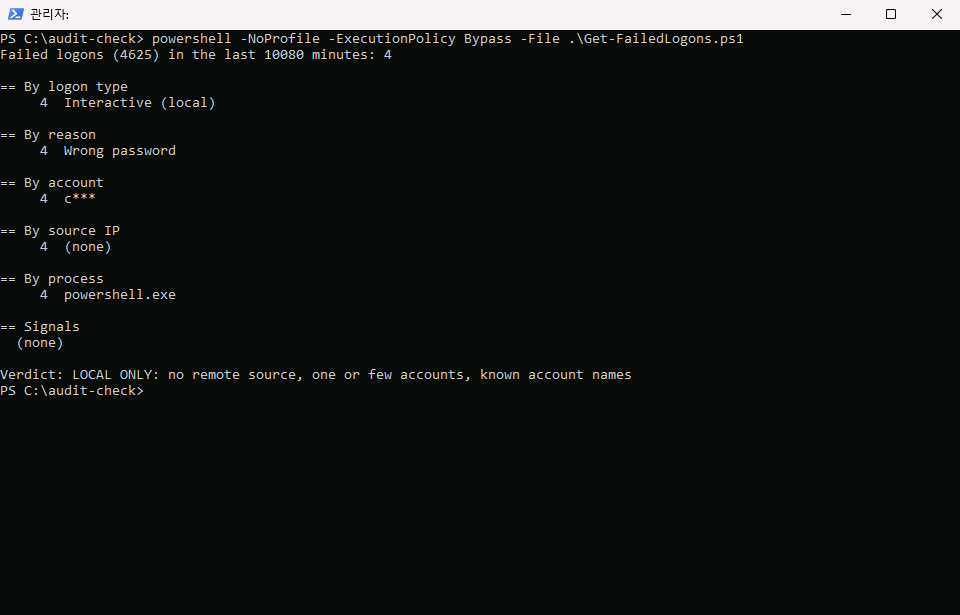
먼저 로컬 실패 4건만 만들고 분석합니다.
powershell -NoProfile -ExecutionPolicy Bypass -File .\New-TestFailedLogons.ps1 -Phase Local
powershell -NoProfile -ExecutionPolicy Bypass -File .\Get-FailedLogons.ps1
# 기대 출력 (일부)
Failed logons (4625) in the last 10080 minutes: 4
     4  Interactive (local)
     4  Wrong password
     4  c***
Verdict: LOCAL ONLY: no remote source, one or few accounts, known account names
4. 원격과 없는 계정을 섞어 REVIEW 만들기
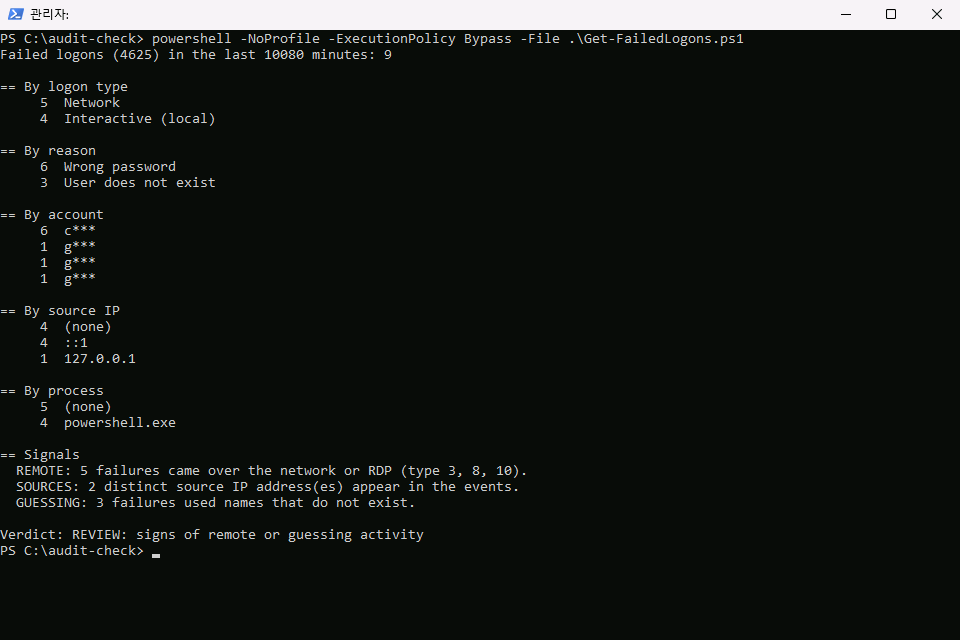
이어서 네트워크 실패와 없는 계정 시도를 더한 뒤 같은 스크립트를 다시 돌립니다.
powershell -NoProfile -ExecutionPolicy Bypass -File .\New-TestFailedLogons.ps1 -Phase Network
powershell -NoProfile -ExecutionPolicy Bypass -File .\New-TestFailedLogons.ps1 -Phase Unknown
powershell -NoProfile -ExecutionPolicy Bypass -File .\Get-FailedLogons.ps1
# 기대 출력 (일부)
Failed logons (4625) in the last 10080 minutes: 9
  REMOTE: 5 failures came over the network or RDP (type 3, 8, 10).
  SOURCES: 2 distinct source IP address(es) appear in the events.
  GUESSING: 3 failures used names that do not exist.
Verdict: REVIEW: signs of remote or guessing activity
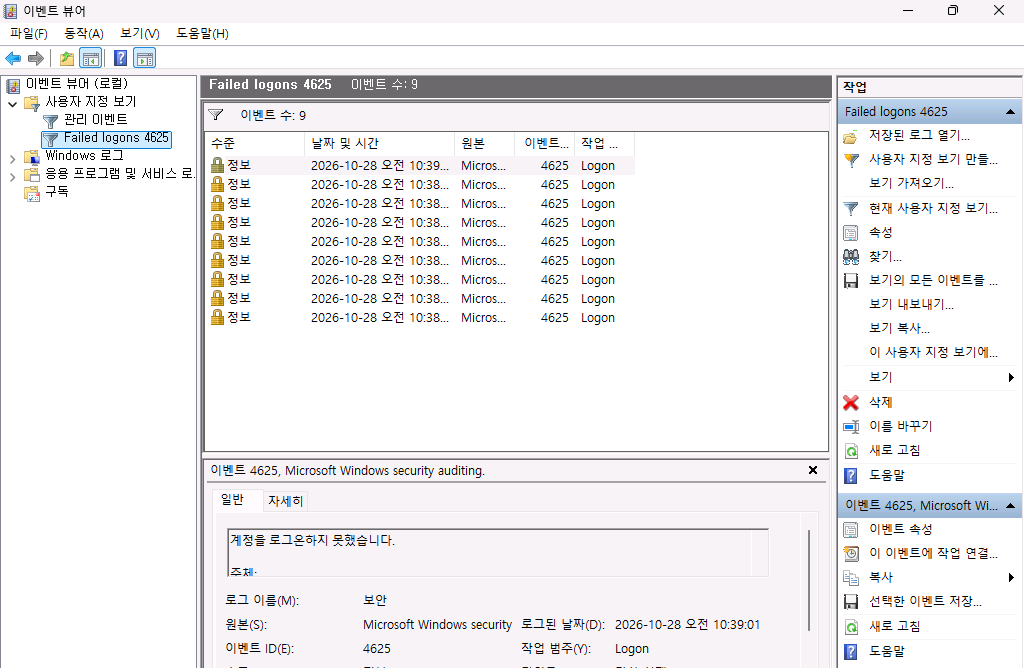
이벤트 뷰어의 사용자 지정 보기에서도 같은 9건이 보입니다.
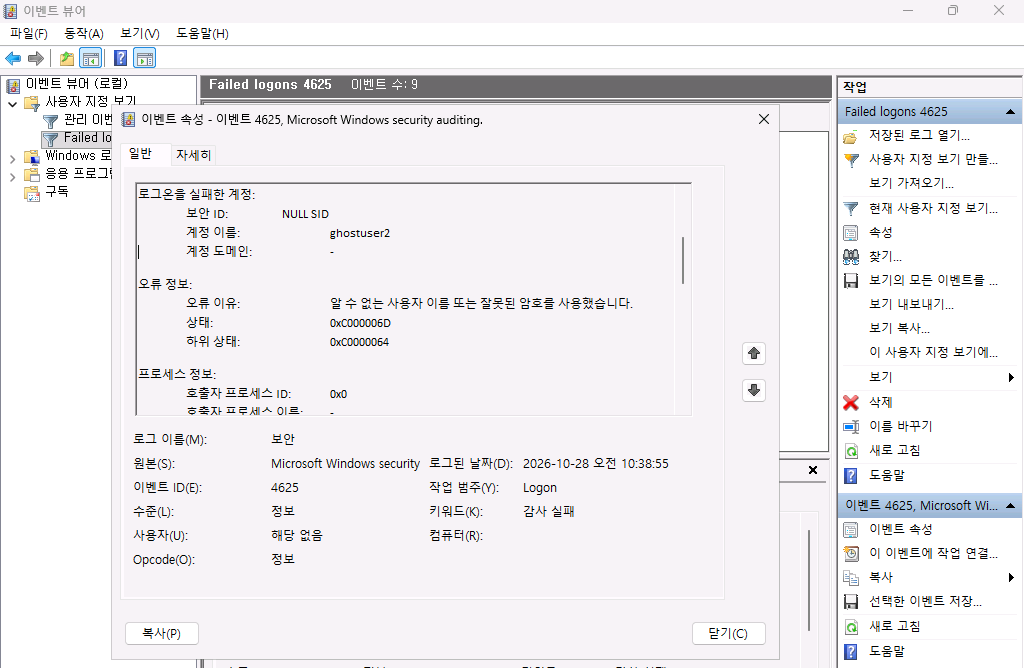
한 건을 열어 스크립트의 판정 근거와 대조합니다. 없는 계정 ghostuser2의 이벤트는 오류 이유가 알 수 없는 사용자 이름 또는 잘못된 암호를 사용했습니다.이고 하위 상태가 0xC0000064입니다. 창을 더 내리면 원본 네트워크 주소와 인증 패키지 항목이 나옵니다. 컴퓨터 이름은 가렸습니다.
5. 원인: 임계값이 느슨하면 여러 번 시도할 수 있습니다
REVIEW가 나왔을 때 실제로 위험한지는 잠금 정책에 달려 있습니다. 이 글의 시작 값은 계정 잠금 임계값 10회입니다. 로컬 보안 정책의 계정 정책, 계정 잠금 정책에서 확인하면 이렇습니다.
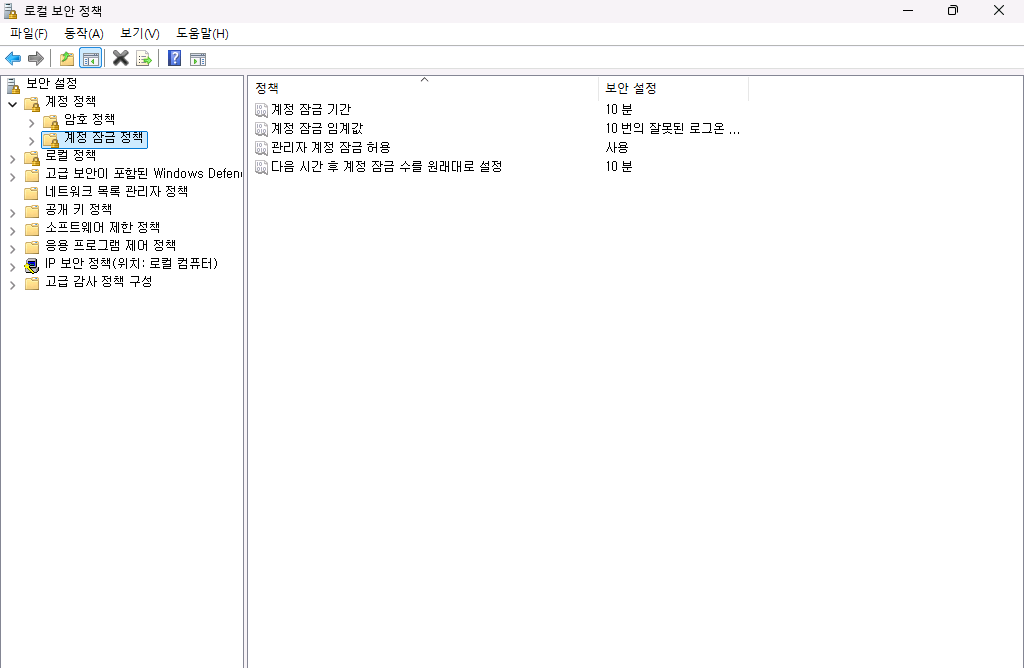
10회라면 10분 안에 틀린 비밀번호를 9번까지 계속 시도해도 계정이 잠기지 않습니다. 이 글의 REVIEW 신호가 실제 공격이었다면 그만큼의 기회를 준 셈입니다.
6. 수정: 임계값을 5회로 낮추기
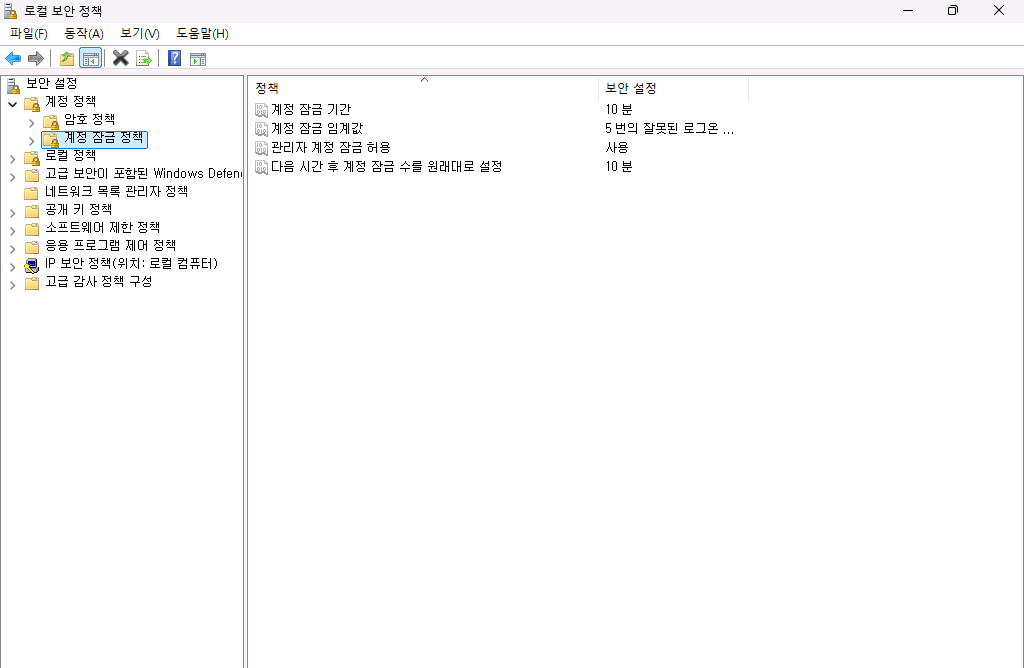
관리자 PowerShell에서 임계값을 5회로 바꿉니다.
net accounts /lockoutthreshold:5
net accounts | findstr /i lockout
로컬 보안 정책을 다시 열면 같은 값이 보입니다.
7. 재확인: 계정이 실제로 잠깁니다
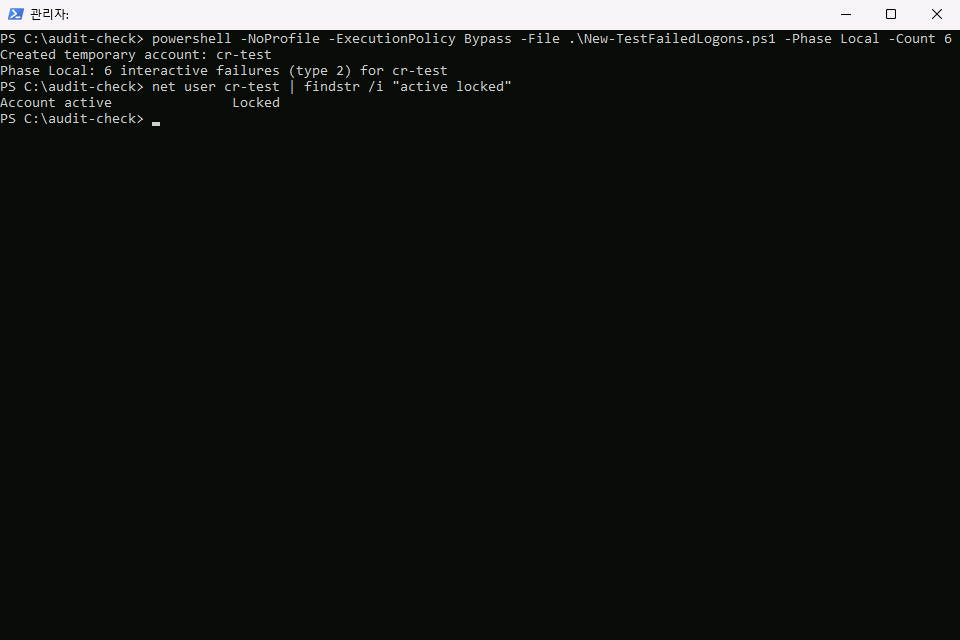
cr-test를 지우고 다시 만든 뒤 틀린 비밀번호를 6번 시도하게 했습니다. 로그를 비운 뒤 한 실험이라 4625는 5건만 남았고, 5번째 실패에서 계정이 잠겼습니다.
powershell -NoProfile -ExecutionPolicy Bypass -File .\New-TestFailedLogons.ps1 -Phase Local -Count 6
net user cr-test | findstr /i "active locked"
# 기대 출력
Created temporary account: cr-test
Phase Local: 6 interactive failures (type 2) for cr-test
Account active               Locked
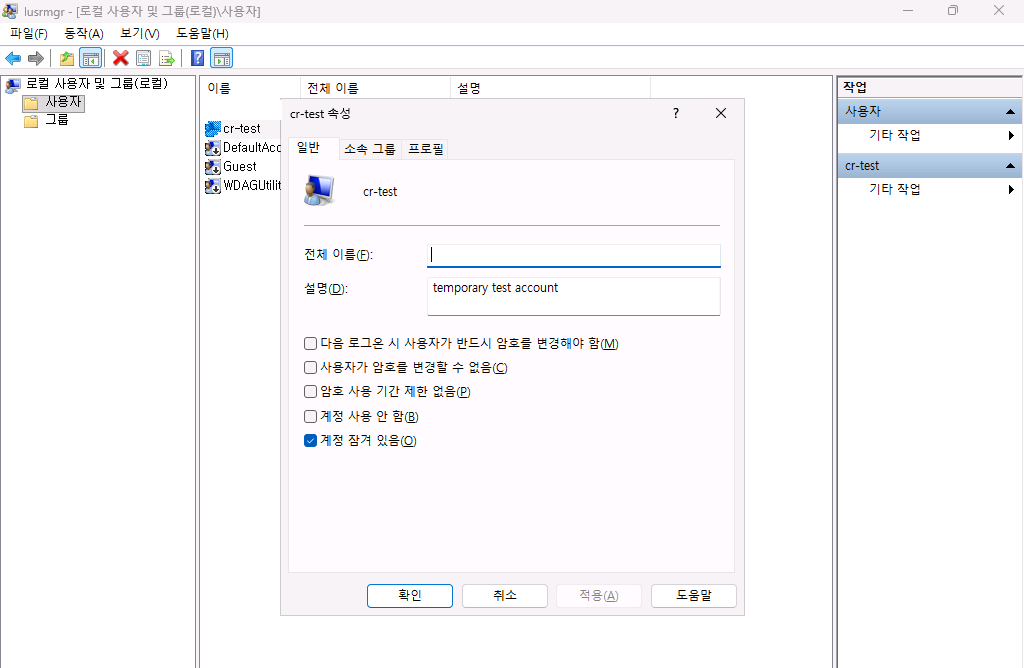
로컬 사용자 및 그룹에서도 cr-test의 속성에 계정 잠겨 있음이 체크되어 있습니다. 기본 제공 관리자 계정 이름은 가렸습니다.
8. 실습 환경 되돌리기
임시 계정을 지우고 잠금 임계값을 원래 값(10)으로 되돌립니다.
# Removes the temporary account and restores the lockout policy changed by this test.
param([int]$LockoutThreshold = 10)
net use \\localhost\IPC$ /delete 2>&1 | Out-Null
if (Get-LocalUser -Name cr-test -ErrorAction SilentlyContinue) { Remove-LocalUser -Name cr-test; Write-Output "Removed cr-test" }
net accounts /lockoutthreshold:$LockoutThreshold | Out-Null
Write-Output "Lockout threshold restored to $LockoutThreshold"
powershell -NoProfile -ExecutionPolicy Bypass -File .\Remove-TestFailedLogons.ps1
# 기대 출력
Removed cr-test
Lockout threshold restored to 10
자주 막히는 곳
| 증상 | 원인과 해결 |
|---|---|
Cannot read the Security log가 나옵니다 |
관리자 PowerShell이 아닙니다. 관리자로 다시 실행합니다 |
| 4625가 하나도 없습니다 | 로그온 감사가 꺼져 있을 수 있습니다. auditpol /get /subcategory:"Logon"으로 실패 감사가 켜져 있는지 봅니다 |
| 네트워크 실패가 한 번만 남습니다 | 같은 서버 이름에 같은 실패를 반복하면 한 번만 기록됩니다. 다른 주소로 시도합니다 |
| 이벤트 뷰어에서 로그를 못 읽습니다 | 관리자 권한으로 연 eventvwr.msc가 필요합니다 |
| 잠긴 계정이 풀리지 않습니다 | 잠금 기간(이 글의 설정은 10분)이 지나면 풀립니다. 바로 풀려면 관리자 계정으로 속성에서 체크를 해제합니다 |
이어서 해 볼 것
- 잠금 이벤트 보기: 계정이 잠길 때 남는 이벤트 4740을 같은 사용자 지정 보기에 추가해 봅니다. 이 글의 범위에는 포함하지 않았습니다.
- 원격 출발지: 같은 네트워크의 다른 컴퓨터에서 실패를 만들어 출발지 주소 항목을 확인해 봅니다.
- 정기 집계: 작업 스케줄러에 스크립트를 등록해 매일 결과를 비교합니다.
확인 범위
- 해 본 것: 2026-10-27, Windows 11의 Windows PowerShell 5.1에서 직접 실행했습니다. 네트워크 실패와 없는 계정 시도도
localhost같은 이 컴퓨터 자신의 주소로 보냈으며, 로컬 실패까지 모두 같은 컴퓨터에서 만들었습니다. 출발지는::1과127.0.0.1뿐입니다. - 해 보지 않은 것: 실제 외부 공격의 출발지 분포, 도메인 환경에서 도메인 컨트롤러에 남는 기록, 원격 데스크톱(유형 10), Windows 10과 Windows Server.
- 읽을 때 주의: 스크립트의 판정 기준은 이 글에서 정한 간단한 기준입니다. 건수나 시간 간격으로 공격 여부를 확정하지 않습니다.
REVIEW는 사람이 봐야 한다는 뜻입니다. 잠금 정책은 공격자가 일부러 계정을 잠가 업무를 막는 데도 쓰일 수 있습니다. 실제 환경에서는 임계값과 잠금 시간을 함께 정합니다.
이 글은 스타트업·소규모 조직 보안 구축 로드맵의 한 단계입니다.
이 글의 다음 단계
- Windows Defender EICAR 시험 파일 탐지 확인Windows 11에서 실시간 보호를 끄고 EICAR 표준 시험 파일을 만들어 탐지되지 않는 것을 확인한 뒤, 실시간 보호를 켜고 같은 시험을 반복합니다. Windows 보안 앱의 보호 기록, 이벤트 뷰어의 이벤트 1116과 1117, PowerShell 점검 스크립트로 결과를 대조합니다.
- Windows 프로세스 만들기 감사와 명령줄 기록을 켜서 이벤트 4688로 실행 흔적 남기기Windows 11에서 프로세스 만들기 감사가 꺼져 있어 실행 기록이 남지 않는 것을 확인하고, 로컬 그룹 정책 편집기로 감사와 명령줄 포함을 켠 뒤 whoami와 hostname 실행이 이벤트 4688로 남는 것을 이벤트 뷰어와 PowerShell로 대조합니다. 명령줄에 비밀번호가 그대로 남는 한계도 함께 확인합니다.
이 내용을 팀 교육으로 진행하고 싶으신가요?
인원, 수준, 일정에 맞춰 실습 환경까지 준비해 진행합니다. 대상과 기간을 알려 주시면 구성을 제안해 드립니다.
교육 문의하기메일로 보내실 수도 있습니다: fankh111@gmail.com