보안 헤더는 설정 파일에 한 번 적었다고 모든 응답에 붙지 않습니다. nginx에서는 add_header를 적은 곳과 응답이 나가는 경로가 어긋나면 일부 응답에서 조용히 사라집니다. 이 글에서는 헤더가 없는 설정, 흔히 하는 설정, 올바른 설정 세 가지를 만들어 같은 네 경로를 검사합니다. 흔히 하는 설정이 첫 화면(/)에서는 통과하는데 로그인, API, 404에서는 전부 빠지는 것을 직접 확인합니다. 앞의 testssl 글이 TLS 설정을 점검했다면, 이 글은 그 위의 HTTP 응답 헤더를 점검합니다.
준비물
| 항목 | 확인한 값 |
|---|---|
| Docker | 29.5.3 (Windows 11, Git Bash에서 실행) |
| 웹 서버 | nginx:alpine, 시험 중 보인 Server 값은 nginx/1.31.8 |
| 인증서 | 시험용 자체 서명(alpine/openssl로 만들고 2일 뒤 만료) |
| 요청 | curlimages/curl 컨테이너 하나에서 curl -sk -D -로 헤더만 저장 |
| 교차 확인 | drwetter/testssl.sh 의 --headers |
| 파이썬 | 3.12 (저장한 헤더를 검사하는 데만 사용) |
모든 컨테이너는 전용 네트워크 osk-fc-hdnet에만 연결하고 포트는 바깥에 열지 않았습니다. 자체 서명 인증서라 curl에는 -k를 썼습니다.
1. 세 가지 설정
| 설정 | 요점 |
|---|---|
bad.conf |
보안 헤더 없음, server_tokens on, 로그인 쿠키에 속성 없음 |
naive.conf |
헤더 다섯 개를 server 블록에만 add_header로 둠(always 없음), 로그인과 API 경로는 자기 add_header를 가짐 |
good.conf |
헤더를 snippet_headers.conf로 빼서 always를 붙이고, 자기 add_header를 가진 경로에서 다시 include |
검사하는 헤더 다섯 개는 Strict-Transport-Security, Content-Security-Policy, X-Content-Type-Options, Referrer-Policy, Permissions-Policy입니다. 세 설정에는 모두 같은 네 경로가 있습니다.
| 경로 | 응답 | 성격 |
|---|---|---|
/ |
200, HTML | 자기 add_header 없음 |
/login |
200, HTML | Set-Cookie를 add_header로 내려줌 |
/api/x |
200, JSON | Cache-Control을 add_header로 내려줌 |
/missing |
404 | 오류 응답 |
2. 검사 기준
hdr_audit.py는 저장한 헤더에서 다음을 봅니다. 하나라도 어기면 그 경로는 실패이고, 실패가 하나라도 있으면 종료 코드 1입니다.
- 위 보안 헤더 다섯 개가 모두 있는가
Server헤더에 버전(/)이 없는가Set-Cookie가 있다면HttpOnly,Secure,SameSite가 모두 있는가
3. 결과
== bad
  root     HTTP 200  보안 헤더 0/5  실패  Server 버전 노출(nginx/1.31.8)
  login    HTTP 200  보안 헤더 0/5  실패  Server 버전 노출(nginx/1.31.8); 쿠키에 httponly·secure·samesite 없음
  종료 코드 1
== naive
  root     HTTP 200  보안 헤더 5/5  통과
  login    HTTP 200  보안 헤더 0/5  실패
  api      HTTP 200  보안 헤더 0/5  실패
  missing  HTTP 404  보안 헤더 0/5  실패
  종료 코드 1
== good
  (네 경로 모두 5/5 통과)
  종료 코드 0
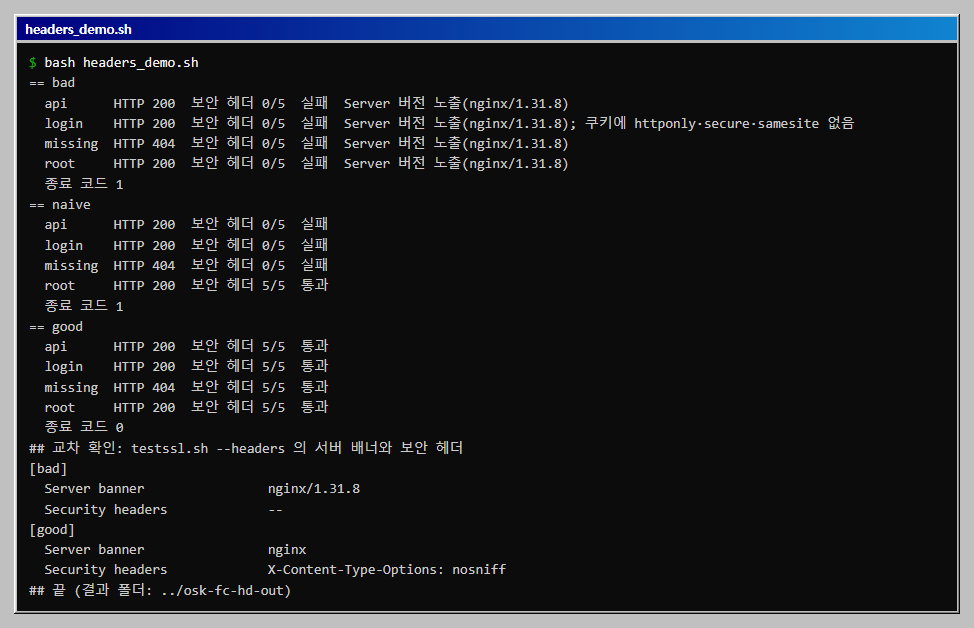
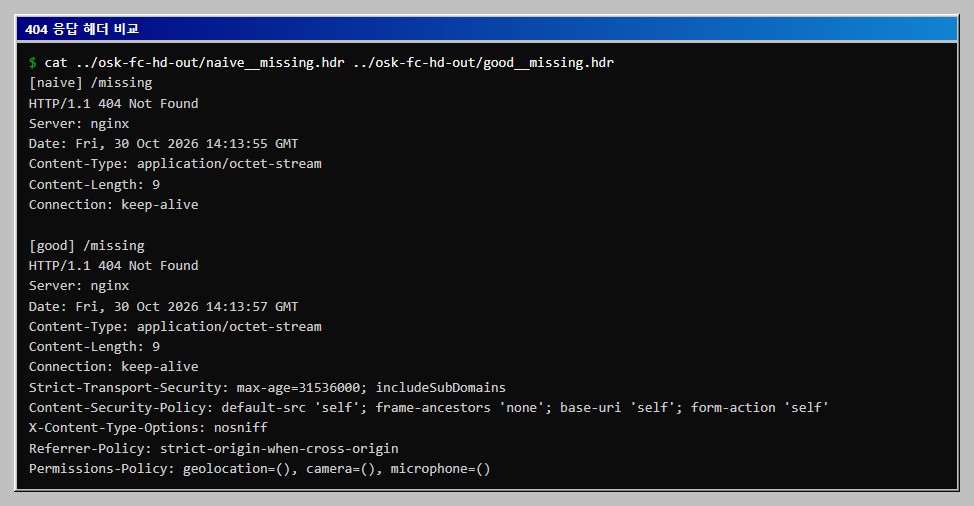
naive가 가장 위험한 설정입니다. 설정 파일에는 헤더 다섯 개가 보이고 첫 화면만 열어 보면 통과하는데, 로그인과 API와 404에는 하나도 붙지 않았습니다. 브라우저 개발자 도구로/만 확인하는 습관으로는 발견하지 못합니다./login과/api/x가 빠진 이유는 상속 규칙입니다. nginx는 하위 블록에add_header가 하나라도 있으면 상위 블록의add_header를 이어받지 않습니다. 이 두 경로는Set-Cookie나Cache-Control을 위해 자기add_header를 썼기 때문에server에 둔 다섯 개를 잃었습니다. 문서의 규칙과 결과가 맞았지만, 이 글에서는 nginx 소스까지 읽지는 않았습니다./missing이 빠진 이유는always때문입니다. 이 경로에는 자기add_header가 없어 상속은 문제가 아니었습니다. 그런데도 404 응답에는 헤더가 붙지 않았고,always를 붙인good에서만 붙었습니다. 기본add_header는 200, 301 같은 정상 응답에만 붙기 때문입니다.bad는Server: nginx/1.31.8로 버전을 알려 줍니다.server_tokens off로Server: nginx까지만 나가게 줄였습니다. 버전을 숨기는 것만으로 취약점이 없어지지는 않으므로 정보 노출을 줄이는 정도로만 봅니다.
4. 404 응답을 나란히 보기
같은 /missing의 원본 응답 헤더입니다. naive에는 보안 헤더 줄이 없고, good에는 다섯 줄이 붙어 있습니다.
5. 교차 확인: testssl.sh의 --headers
직접 만든 검사가 틀리지 않았는지 확인하려고 다른 도구로 두 서버의 첫 화면을 봤습니다.
| 서버 | testssl Server banner |
testssl Security headers |
|---|---|---|
bad |
nginx/1.31.8 |
--(없음) |
good |
nginx |
X-Content-Type-Options: nosniff 등이 나열됨 |
testssl은 첫 화면만 보므로 naive의 문제(다른 경로에서 빠짐)는 이 방법으로는 잡히지 않습니다. 경로별 검사를 직접 만든 이유가 거기에 있습니다.
6. 헤더 값 메모
Strict-Transport-Security는 HTTPS 응답에서만 의미가 있습니다. 이 글은 시험용 자체 서명 인증서를 썼고max-age는 1년(31536000)으로 적었으며, 브라우저가 실제로 기억하는지는 확인하지 않았습니다.Content-Security-Policy는default-src 'self'처럼 엄격하게 시작했습니다. 실제 서비스에서는 외부 스크립트와 이미지 때문에 바로 적용하면 화면이 깨질 수 있어, 보고만 하는Content-Security-Policy-Report-Only로 먼저 시험해야 합니다. 이 글에서는 그 시험을 하지 않았습니다.X-Frame-Options대신 CSP의frame-ancestors 'none'을 썼습니다. 구형 브라우저 호환은 확인하지 않았습니다.
전체 코드
전체를 한 번에 돌리는 스크립트입니다. 아래 파일과 같은 폴더에서 실행합니다.
# headers_demo.sh
#!/usr/bin/env bash
# nginx 설정 세 가지(헤더 없음, 헤더를 server 에만 둔 설정, 올바른 설정)에서 네 경로의 응답 헤더를 모아 검사한다.
# 준비: Docker, python, 같은 폴더에 bad.conf, naive.conf, good.conf, snippet_headers.conf, hdr_audit.py. 내 PC의 컨테이너에만 요청한다.
# 실행(Git Bash): bash headers_demo.sh   (약 1분)
export MSYS_NO_PATHCONV=1
HERE="$(pwd)"
OUT=../osk-fc-hd-out                     # 결과 폴더는 설정 폴더 밖에 둔다
rm -rf "$OUT"; mkdir -p "$OUT/certs"; ABS="$(cd "$OUT" && pwd)"
cleanup() { docker rm -f osk-fc-hd-bad osk-fc-hd-naive osk-fc-hd-good osk-fc-hd-cli >/dev/null 2>&1; docker network rm osk-fc-hdnet >/dev/null 2>&1; }
cleanup
docker run --rm -v "$ABS/certs:/c" --entrypoint sh alpine/openssl -c \
  'openssl req -x509 -newkey rsa:2048 -nodes -keyout /c/tls.key -out /c/tls.crt -days 2 -subj /CN=hd.lab >/dev/null 2>&1'
docker network create osk-fc-hdnet >/dev/null
for n in bad naive good; do
  docker run -d --name osk-fc-hd-$n --network osk-fc-hdnet \
    -v "$HERE/$n.conf:/etc/nginx/conf.d/default.conf:ro" \
    -v "$HERE/snippet_headers.conf:/etc/nginx/snippets/security_headers.conf:ro" \
    -v "$ABS/certs:/certs:ro" nginx:alpine >/dev/null
done
docker run -d --name osk-fc-hd-cli --network osk-fc-hdnet --entrypoint sleep curlimages/curl 3600 >/dev/null
sleep 3
for n in bad naive good; do
  for p in "root:/" "login:/login" "api:/api/x" "missing:/missing"; do
    docker exec osk-fc-hd-cli curl -sk -D - -o /dev/null "https://osk-fc-hd-$n${p#*:}" | tr -d '\r' > "$OUT/${n}__${p%%:*}.hdr"
  done
  python hdr_audit.py "$OUT" $n; echo "  종료 코드 $?"
done
echo "## 교차 확인: testssl.sh --headers 의 서버 배너와 보안 헤더"
for n in bad good; do
  echo "[$n]"; docker run --rm --network osk-fc-hdnet drwetter/testssl.sh --headers --color 0 osk-fc-hd-$n:443 2>&1 \
    | grep -E 'Server banner|Security headers' | sed 's/^ */  /'
done
cleanup
echo "## 끝 (결과 폴더: $OUT)"
저장한 응답 헤더를 검사하고 종료 코드로 판정하는 스크립트입니다.
# hdr_audit.py
#!/usr/bin/env python3
"""저장해 둔 응답 헤더(.hdr 파일)를 검사해 경로별 결과를 보여 주고, 하나라도 기준을 어기면 종료 코드 1로 끝낸다.
사용: python hdr_audit.py 폴더 설정이름   (파일 이름 형식: 설정이름__경로이름.hdr)"""
import glob
import os
import sys

sys.stdout.reconfigure(encoding="utf-8")

REQUIRED = [
    "strict-transport-security",
    "content-security-policy",
    "x-content-type-options",
    "referrer-policy",
    "permissions-policy",
]
folder, name = sys.argv[1], sys.argv[2]
failed = False
print(f"== {name}")
for path in sorted(glob.glob(os.path.join(folder, f"{name}__*.hdr"))):
    label = os.path.basename(path)[len(name) + 2:-4]
    lines = [l.rstrip("\r\n") for l in open(path, encoding="utf-8") if l.strip()]
    status = lines[0].split()[1]
    headers = {}
    cookies = []
    for line in lines[1:]:
        k, _, v = line.partition(":")
        k, v = k.strip().lower(), v.strip()
        headers[k] = v
        if k == "set-cookie":
            cookies.append(v)
    have = sum(1 for h in REQUIRED if h in headers)
    notes = []
    server = headers.get("server", "")
    if "/" in server:
        notes.append(f"Server 버전 노출({server})")
    for c in cookies:
        low = c.lower()
        miss = [f for f in ("httponly", "secure", "samesite") if f not in low]
        if miss:
            notes.append("쿠키에 " + "·".join(miss) + " 없음")
    ok = have == len(REQUIRED) and not notes
    failed |= not ok
    print(f"  {label:<8} HTTP {status}  보안 헤더 {have}/{len(REQUIRED)}  {'통과' if ok else '실패'}  {'; '.join(notes)}")
sys.exit(1 if failed else 0)
보안 헤더가 없는 설정입니다.
# bad.conf
server {
  listen 443 ssl;
  ssl_certificate     /certs/tls.crt;
  ssl_certificate_key /certs/tls.key;
  server_tokens on;
  location / {
    default_type text/html;
    return 200 "<h1>hello</h1>";
  }
  location = /login {
    add_header Set-Cookie "sid=abc123; Path=/";
    default_type text/html;
    return 200 "<h1>login</h1>";
  }
  location /api/ {
    add_header Cache-Control "no-store";
    default_type application/json;
    return 200 "{\"ok\":true}";
  }
  location = /missing {
    return 404 "not found";
  }
}
헤더를 server 블록에만 둔 흔한 설정입니다. 첫 화면만 통과합니다.
# naive.conf
server {
  listen 443 ssl;
  ssl_certificate     /certs/tls.crt;
  ssl_certificate_key /certs/tls.key;
  server_tokens off;
  # always 없이 server 수준에만 둔 헤더: 오류 응답에는 붙지 않고, 자체 add_header 가 있는 location 에는 상속되지 않는다
  add_header Strict-Transport-Security "max-age=31536000; includeSubDomains";
  add_header Content-Security-Policy "default-src 'self'; frame-ancestors 'none'; base-uri 'self'; form-action 'self'";
  add_header X-Content-Type-Options "nosniff";
  add_header Referrer-Policy "strict-origin-when-cross-origin";
  add_header Permissions-Policy "geolocation=(), camera=(), microphone=()";
  location / {
    default_type text/html;
    return 200 "<h1>hello</h1>";
  }
  location = /login {
    add_header Set-Cookie "sid=abc123; Path=/; HttpOnly; Secure; SameSite=Lax";
    default_type text/html;
    return 200 "<h1>login</h1>";
  }
  location /api/ {
    add_header Cache-Control "no-store";
    default_type application/json;
    return 200 "{\"ok\":true}";
  }
  location = /missing {
    return 404 "not found";
  }
}
올바른 설정입니다. 헤더는 아래 조각 파일로 빼서 경로마다 다시 포함합니다.
# good.conf
server {
  listen 443 ssl;
  ssl_certificate     /certs/tls.crt;
  ssl_certificate_key /certs/tls.key;
  server_tokens off;
  include /etc/nginx/snippets/security_headers.conf;
  location / {
    default_type text/html;
    return 200 "<h1>hello</h1>";
  }
  location = /login {
    include /etc/nginx/snippets/security_headers.conf;   # add_header 를 쓰는 location 은 헤더를 다시 포함한다
    add_header Set-Cookie "sid=abc123; Path=/; HttpOnly; Secure; SameSite=Lax";
    default_type text/html;
    return 200 "<h1>login</h1>";
  }
  location /api/ {
    include /etc/nginx/snippets/security_headers.conf;   # add_header 를 쓰는 location 은 헤더를 다시 포함한다
    add_header Cache-Control "no-store";
    default_type application/json;
    return 200 "{\"ok\":true}";
  }
  location = /missing {
    include /etc/nginx/snippets/security_headers.conf;
    return 404 "not found";
  }
}
always를 붙인 보안 헤더 조각입니다.
# snippet_headers.conf
add_header Strict-Transport-Security "max-age=31536000; includeSubDomains" always;
add_header Content-Security-Policy "default-src 'self'; frame-ancestors 'none'; base-uri 'self'; form-action 'self'" always;
add_header X-Content-Type-Options "nosniff" always;
add_header Referrer-Policy "strict-origin-when-cross-origin" always;
add_header Permissions-Policy "geolocation=(), camera=(), microphone=()" always;
자주 막히는 곳
| 증상 | 원인 | 해결 |
|---|---|---|
| 헤더를 넣었는데 일부 경로에서 빠짐 | 그 경로(location)에 자기 add_header가 있어 상위 설정을 이어받지 않음 |
경로마다 같은 include를 다시 넣음 |
| 404, 500 응답에 헤더가 없음 | always 없이 add_header를 씀 |
모든 add_header 끝에 always |
파이썬이 .hdr 파일을 못 찾음 |
파일 이름 형식(설정__경로.hdr)이 어긋남 |
스크립트가 만드는 이름 그대로 사용 |
curl: (60) SSL certificate problem |
자체 서명 인증서 | 시험에서만 -k |
Server 헤더가 계속 버전을 보여 줌 |
server_tokens off가 http나 server에 없음 |
해당 server에 server_tokens off; |
확인 범위
- 해 본 것: 2026-10-30, Windows 11 · Docker 29.5.3 ·
nginx:alpine에서 설정 세 가지와 네 경로의 응답 헤더를 저장해 검사했고(bad 전부 실패, naive는/만 통과, good 전부 통과), testssl의--headers로bad와good의 첫 화면을 교차 확인했습니다. 전체 스크립트를 두 번 실행해 결과가 같았고, 끝에 컨테이너와 네트워크를 지웠습니다. - 해 보지 않은 것: 브라우저에서 CSP가 실제로 작동하는지, HSTS의 브라우저 기억, Report-Only 시험,
proxy_pass뒤쪽 서버가 내려주는 헤더와의 중복, CDN과 로드 밸런서가 헤더를 바꾸는 경우, Apache와 IIS 설정, Linux와 macOS. - 읽을 때 주의: 헤더 값은 시험용입니다. 실제 서비스의 CSP는 화면에 맞춰 따로 설계해야 합니다. 상속 규칙은 이 nginx 버전에서 결과로 확인한 것입니다.
이 글은 스타트업·소규모 조직 보안 구축 로드맵의 한 단계입니다.
이 글의 다음 단계
- nginx ModSecurity와 OWASP CRS 웹 공격 차단 시험ModSecurity 3과 OWASP 핵심 규칙 세트(CRS)가 든 nginx 컨테이너에 공격 요청 8건과 정상 요청 8건을 보내, 탐지만 하는 모드와 차단 모드, 민감도 1에서 4까지의 결과를 표로 비교합니다. 차단률과 오차단을 종료 코드 게이트로 바꾸고 민감도를 올리면 정상 요청이 막히는 지점을 확인합니다.
- testssl.sh로 내 서버의 TLS 설정 점검하기: 약한 서버와 고친 서버를 같은 기준으로 비교일부러 약하게 만든 nginx와 고친 nginx를 컨테이너로 띄워 testssl.sh로 점검합니다. 프로토콜, 인증서, 취약점, 보안 헤더를 읽고, JSON 결과를 심각도로 집계해 CI 기준(종료 코드)까지 만들어 실행으로 확인합니다.
이 내용을 팀 교육으로 진행하고 싶으신가요?
인원, 수준, 일정에 맞춰 실습 환경까지 준비해 진행합니다. 대상과 기간을 알려 주시면 구성을 제안해 드립니다.
교육 문의하기메일로 보내실 수도 있습니다: fankh111@gmail.com