# nginx 보안 헤더 설정 전후 비교: add_header가 404와 일부 경로에서 빠지는 함정
> 보안 헤더가 없는 nginx, 헤더를 server에만 둔 nginx, 올바르게 설정한 nginx를 만들어 네 경로의 응답 헤더를 스크립트로 검사합니다. 같은 설정인데 로그인과 API 경로와 404 응답에서 헤더가 빠지는 것을 확인하고, 서버 버전 노출과 쿠키 속성까지 종료 코드 게이트로 묶습니다.
- 주소: https://copyandrun.com/blog/security-headers-nginx-before-after/
- 분야: DevSecOps
- 발행일: 2026-10-30
- 태그: 보안 헤더, nginx, HSTS, CSP, add_header
보안 헤더는 설정 파일에 한 번 적었다고 모든 응답에 붙지 않습니다. nginx에서는 `add_header`를 적은 곳과 응답이 나가는 경로가 어긋나면 일부 응답에서 조용히 사라집니다. 이 글에서는 헤더가 없는 설정, 흔히 하는 설정, 올바른 설정 세 가지를 만들어 같은 네 경로를 검사합니다. 흔히 하는 설정이 첫 화면(`/`)에서는 통과하는데 로그인, API, 404에서는 전부 빠지는 것을 직접 확인합니다. 앞의 [testssl 글](/blog/testssl-local-tls-check/)이 TLS 설정을 점검했다면, 이 글은 그 위의 HTTP 응답 헤더를 점검합니다.
## 준비물
| 항목 | 확인한 값 |
|---|---|
| Docker | 29.5.3 (Windows 11, Git Bash에서 실행) |
| 웹 서버 | `nginx:alpine`, 시험 중 보인 `Server` 값은 `nginx/1.31.8` |
| 인증서 | 시험용 자체 서명(`alpine/openssl`로 만들고 2일 뒤 만료) |
| 요청 | `curlimages/curl` 컨테이너 하나에서 `curl -sk -D -`로 헤더만 저장 |
| 교차 확인 | `drwetter/testssl.sh` 의 `--headers` |
| 파이썬 | 3.12 (저장한 헤더를 검사하는 데만 사용) |
모든 컨테이너는 전용 네트워크 `osk-fc-hdnet`에만 연결하고 포트는 바깥에 열지 않았습니다. 자체 서명 인증서라 curl에는 `-k`를 썼습니다.
## 1. 세 가지 설정
| 설정 | 요점 |
|---|---|
| `bad.conf` | 보안 헤더 없음, `server_tokens on`, 로그인 쿠키에 속성 없음 |
| `naive.conf` | 헤더 다섯 개를 `server` 블록에만 `add_header`로 둠(`always` 없음), 로그인과 API 경로는 자기 `add_header`를 가짐 |
| `good.conf` | 헤더를 `snippet_headers.conf`로 빼서 `always`를 붙이고, 자기 `add_header`를 가진 경로에서 다시 `include` |
검사하는 헤더 다섯 개는 `Strict-Transport-Security`, `Content-Security-Policy`, `X-Content-Type-Options`, `Referrer-Policy`, `Permissions-Policy`입니다. 세 설정에는 모두 같은 네 경로가 있습니다.
| 경로 | 응답 | 성격 |
|---|---|---|
| `/` | 200, HTML | 자기 `add_header` 없음 |
| `/login` | 200, HTML | `Set-Cookie`를 `add_header`로 내려줌 |
| `/api/x` | 200, JSON | `Cache-Control`을 `add_header`로 내려줌 |
| `/missing` | 404 | 오류 응답 |
## 2. 검사 기준
`hdr_audit.py`는 저장한 헤더에서 다음을 봅니다. 하나라도 어기면 그 경로는 실패이고, 실패가 하나라도 있으면 종료 코드 1입니다.
- 위 보안 헤더 다섯 개가 모두 있는가
- `Server` 헤더에 버전(`/`)이 없는가
- `Set-Cookie`가 있다면 `HttpOnly`, `Secure`, `SameSite`가 모두 있는가
## 3. 결과
```
== bad
root HTTP 200 보안 헤더 0/5 실패 Server 버전 노출(nginx/1.31.8)
login HTTP 200 보안 헤더 0/5 실패 Server 버전 노출(nginx/1.31.8); 쿠키에 httponly·secure·samesite 없음
종료 코드 1
== naive
root HTTP 200 보안 헤더 5/5 통과
login HTTP 200 보안 헤더 0/5 실패
api HTTP 200 보안 헤더 0/5 실패
missing HTTP 404 보안 헤더 0/5 실패
종료 코드 1
== good
(네 경로 모두 5/5 통과)
종료 코드 0
```
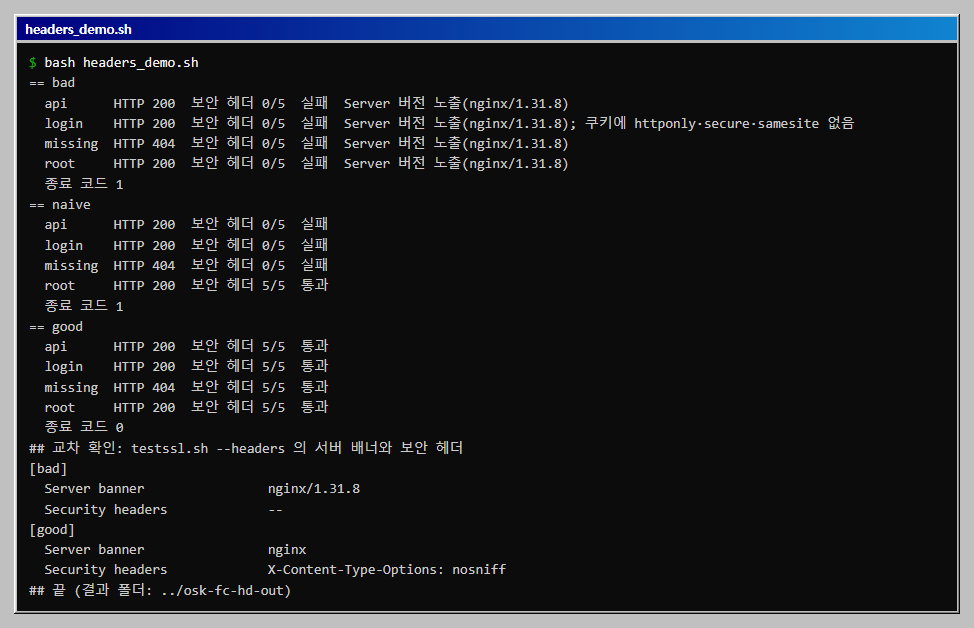
- **`naive`가 가장 위험한 설정입니다.** 설정 파일에는 헤더 다섯 개가 보이고 첫 화면만 열어 보면 통과하는데, 로그인과 API와 404에는 하나도 붙지 않았습니다. 브라우저 개발자 도구로 `/`만 확인하는 습관으로는 발견하지 못합니다.
- **`/login`과 `/api/x`가 빠진 이유는 상속 규칙입니다.** nginx는 하위 블록에 `add_header`가 하나라도 있으면 상위 블록의 `add_header`를 이어받지 않습니다. 이 두 경로는 `Set-Cookie`나 `Cache-Control`을 위해 자기 `add_header`를 썼기 때문에 `server`에 둔 다섯 개를 잃었습니다. 문서의 규칙과 결과가 맞았지만, 이 글에서는 nginx 소스까지 읽지는 않았습니다.
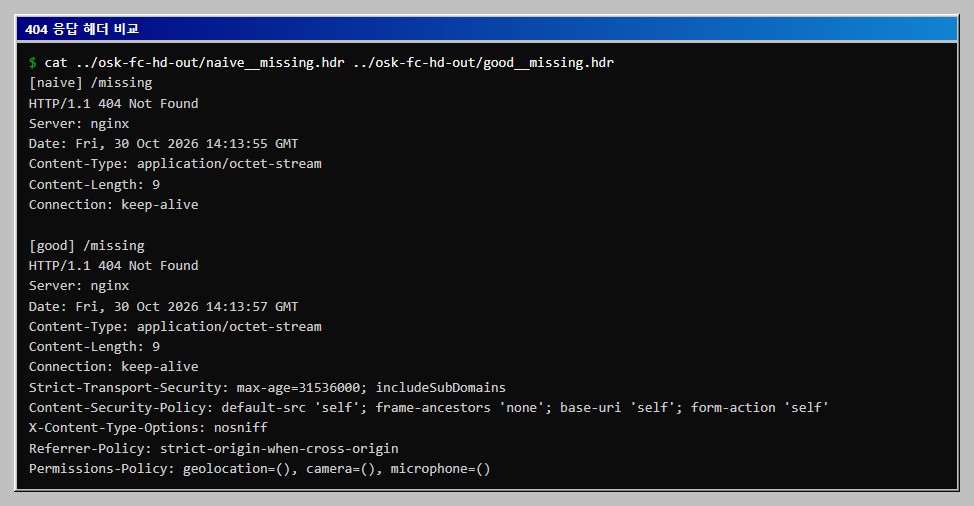
- **`/missing`이 빠진 이유는 `always` 때문입니다.** 이 경로에는 자기 `add_header`가 없어 상속은 문제가 아니었습니다. 그런데도 404 응답에는 헤더가 붙지 않았고, `always`를 붙인 `good`에서만 붙었습니다. 기본 `add_header`는 200, 301 같은 정상 응답에만 붙기 때문입니다.
- **`bad`는 `Server: nginx/1.31.8`로 버전을 알려 줍니다.** `server_tokens off`로 `Server: nginx`까지만 나가게 줄였습니다. 버전을 숨기는 것만으로 취약점이 없어지지는 않으므로 정보 노출을 줄이는 정도로만 봅니다.
## 4. 404 응답을 나란히 보기
같은 `/missing`의 원본 응답 헤더입니다. `naive`에는 보안 헤더 줄이 없고, `good`에는 다섯 줄이 붙어 있습니다.
## 5. 교차 확인: testssl.sh의 `--headers`
직접 만든 검사가 틀리지 않았는지 확인하려고 다른 도구로 두 서버의 첫 화면을 봤습니다.
| 서버 | testssl `Server banner` | testssl `Security headers` |
|---|---|---|
| `bad` | `nginx/1.31.8` | `--`(없음) |
| `good` | `nginx` | `X-Content-Type-Options: nosniff` 등이 나열됨 |
testssl은 첫 화면만 보므로 `naive`의 문제(다른 경로에서 빠짐)는 이 방법으로는 잡히지 않습니다. 경로별 검사를 직접 만든 이유가 거기에 있습니다.
## 6. 헤더 값 메모
- `Strict-Transport-Security`는 HTTPS 응답에서만 의미가 있습니다. 이 글은 시험용 자체 서명 인증서를 썼고 `max-age`는 1년(31536000)으로 적었으며, 브라우저가 실제로 기억하는지는 확인하지 않았습니다.
- `Content-Security-Policy`는 `default-src 'self'`처럼 엄격하게 시작했습니다. 실제 서비스에서는 외부 스크립트와 이미지 때문에 바로 적용하면 화면이 깨질 수 있어, 보고만 하는 `Content-Security-Policy-Report-Only`로 먼저 시험해야 합니다. 이 글에서는 그 시험을 하지 않았습니다.
- `X-Frame-Options` 대신 CSP의 `frame-ancestors 'none'`을 썼습니다. 구형 브라우저 호환은 확인하지 않았습니다.
## 전체 코드
전체를 한 번에 돌리는 스크립트입니다. 아래 파일과 같은 폴더에서 실행합니다.
```bash
# headers_demo.sh
#!/usr/bin/env bash
# nginx 설정 세 가지(헤더 없음, 헤더를 server 에만 둔 설정, 올바른 설정)에서 네 경로의 응답 헤더를 모아 검사한다.
# 준비: Docker, python, 같은 폴더에 bad.conf, naive.conf, good.conf, snippet_headers.conf, hdr_audit.py. 내 PC의 컨테이너에만 요청한다.
# 실행(Git Bash): bash headers_demo.sh (약 1분)
export MSYS_NO_PATHCONV=1
HERE="$(pwd)"
OUT=../osk-fc-hd-out # 결과 폴더는 설정 폴더 밖에 둔다
rm -rf "$OUT"; mkdir -p "$OUT/certs"; ABS="$(cd "$OUT" && pwd)"
cleanup() { docker rm -f osk-fc-hd-bad osk-fc-hd-naive osk-fc-hd-good osk-fc-hd-cli >/dev/null 2>&1; docker network rm osk-fc-hdnet >/dev/null 2>&1; }
cleanup
docker run --rm -v "$ABS/certs:/c" --entrypoint sh alpine/openssl -c \
'openssl req -x509 -newkey rsa:2048 -nodes -keyout /c/tls.key -out /c/tls.crt -days 2 -subj /CN=hd.lab >/dev/null 2>&1'
docker network create osk-fc-hdnet >/dev/null
for n in bad naive good; do
docker run -d --name osk-fc-hd-$n --network osk-fc-hdnet \
-v "$HERE/$n.conf:/etc/nginx/conf.d/default.conf:ro" \
-v "$HERE/snippet_headers.conf:/etc/nginx/snippets/security_headers.conf:ro" \
-v "$ABS/certs:/certs:ro" nginx:alpine >/dev/null
done
docker run -d --name osk-fc-hd-cli --network osk-fc-hdnet --entrypoint sleep curlimages/curl 3600 >/dev/null
sleep 3
for n in bad naive good; do
for p in "root:/" "login:/login" "api:/api/x" "missing:/missing"; do
docker exec osk-fc-hd-cli curl -sk -D - -o /dev/null "https://osk-fc-hd-$n${p#*:}" | tr -d '\r' > "$OUT/${n}__${p%%:*}.hdr"
done
python hdr_audit.py "$OUT" $n; echo " 종료 코드 $?"
done
echo "## 교차 확인: testssl.sh --headers 의 서버 배너와 보안 헤더"
for n in bad good; do
echo "[$n]"; docker run --rm --network osk-fc-hdnet drwetter/testssl.sh --headers --color 0 osk-fc-hd-$n:443 2>&1 \
| grep -E 'Server banner|Security headers' | sed 's/^ */ /'
done
cleanup
echo "## 끝 (결과 폴더: $OUT)"
```
저장한 응답 헤더를 검사하고 종료 코드로 판정하는 스크립트입니다.
```python
# hdr_audit.py
#!/usr/bin/env python3
"""저장해 둔 응답 헤더(.hdr 파일)를 검사해 경로별 결과를 보여 주고, 하나라도 기준을 어기면 종료 코드 1로 끝낸다.
사용: python hdr_audit.py 폴더 설정이름 (파일 이름 형식: 설정이름__경로이름.hdr)"""
import glob
import os
import sys
sys.stdout.reconfigure(encoding="utf-8")
REQUIRED = [
"strict-transport-security",
"content-security-policy",
"x-content-type-options",
"referrer-policy",
"permissions-policy",
]
folder, name = sys.argv[1], sys.argv[2]
failed = False
print(f"== {name}")
for path in sorted(glob.glob(os.path.join(folder, f"{name}__*.hdr"))):
label = os.path.basename(path)[len(name) + 2:-4]
lines = [l.rstrip("\r\n") for l in open(path, encoding="utf-8") if l.strip()]
status = lines[0].split()[1]
headers = {}
cookies = []
for line in lines[1:]:
k, _, v = line.partition(":")
k, v = k.strip().lower(), v.strip()
headers[k] = v
if k == "set-cookie":
cookies.append(v)
have = sum(1 for h in REQUIRED if h in headers)
notes = []
server = headers.get("server", "")
if "/" in server:
notes.append(f"Server 버전 노출({server})")
for c in cookies:
low = c.lower()
miss = [f for f in ("httponly", "secure", "samesite") if f not in low]
if miss:
notes.append("쿠키에 " + "·".join(miss) + " 없음")
ok = have == len(REQUIRED) and not notes
failed |= not ok
print(f" {label:<8} HTTP {status} 보안 헤더 {have}/{len(REQUIRED)} {'통과' if ok else '실패'} {'; '.join(notes)}")
sys.exit(1 if failed else 0)
```
보안 헤더가 없는 설정입니다.
```nginx
# bad.conf
server {
listen 443 ssl;
ssl_certificate /certs/tls.crt;
ssl_certificate_key /certs/tls.key;
server_tokens on;
location / {
default_type text/html;
return 200 "hello
";
}
location = /login {
add_header Set-Cookie "sid=abc123; Path=/";
default_type text/html;
return 200 "login
";
}
location /api/ {
add_header Cache-Control "no-store";
default_type application/json;
return 200 "{\"ok\":true}";
}
location = /missing {
return 404 "not found";
}
}
```
헤더를 server 블록에만 둔 흔한 설정입니다. 첫 화면만 통과합니다.
```nginx
# naive.conf
server {
listen 443 ssl;
ssl_certificate /certs/tls.crt;
ssl_certificate_key /certs/tls.key;
server_tokens off;
# always 없이 server 수준에만 둔 헤더: 오류 응답에는 붙지 않고, 자체 add_header 가 있는 location 에는 상속되지 않는다
add_header Strict-Transport-Security "max-age=31536000; includeSubDomains";
add_header Content-Security-Policy "default-src 'self'; frame-ancestors 'none'; base-uri 'self'; form-action 'self'";
add_header X-Content-Type-Options "nosniff";
add_header Referrer-Policy "strict-origin-when-cross-origin";
add_header Permissions-Policy "geolocation=(), camera=(), microphone=()";
location / {
default_type text/html;
return 200 "hello
";
}
location = /login {
add_header Set-Cookie "sid=abc123; Path=/; HttpOnly; Secure; SameSite=Lax";
default_type text/html;
return 200 "login
";
}
location /api/ {
add_header Cache-Control "no-store";
default_type application/json;
return 200 "{\"ok\":true}";
}
location = /missing {
return 404 "not found";
}
}
```
올바른 설정입니다. 헤더는 아래 조각 파일로 빼서 경로마다 다시 포함합니다.
```nginx
# good.conf
server {
listen 443 ssl;
ssl_certificate /certs/tls.crt;
ssl_certificate_key /certs/tls.key;
server_tokens off;
include /etc/nginx/snippets/security_headers.conf;
location / {
default_type text/html;
return 200 "hello
";
}
location = /login {
include /etc/nginx/snippets/security_headers.conf; # add_header 를 쓰는 location 은 헤더를 다시 포함한다
add_header Set-Cookie "sid=abc123; Path=/; HttpOnly; Secure; SameSite=Lax";
default_type text/html;
return 200 "login
";
}
location /api/ {
include /etc/nginx/snippets/security_headers.conf; # add_header 를 쓰는 location 은 헤더를 다시 포함한다
add_header Cache-Control "no-store";
default_type application/json;
return 200 "{\"ok\":true}";
}
location = /missing {
include /etc/nginx/snippets/security_headers.conf;
return 404 "not found";
}
}
```
`always`를 붙인 보안 헤더 조각입니다.
```nginx
# snippet_headers.conf
add_header Strict-Transport-Security "max-age=31536000; includeSubDomains" always;
add_header Content-Security-Policy "default-src 'self'; frame-ancestors 'none'; base-uri 'self'; form-action 'self'" always;
add_header X-Content-Type-Options "nosniff" always;
add_header Referrer-Policy "strict-origin-when-cross-origin" always;
add_header Permissions-Policy "geolocation=(), camera=(), microphone=()" always;
```
## 자주 막히는 곳
| 증상 | 원인 | 해결 |
|---|---|---|
| 헤더를 넣었는데 일부 경로에서 빠짐 | 그 경로(location)에 자기 `add_header`가 있어 상위 설정을 이어받지 않음 | 경로마다 같은 `include`를 다시 넣음 |
| 404, 500 응답에 헤더가 없음 | `always` 없이 `add_header`를 씀 | 모든 `add_header` 끝에 `always` |
| 파이썬이 `.hdr` 파일을 못 찾음 | 파일 이름 형식(`설정__경로.hdr`)이 어긋남 | 스크립트가 만드는 이름 그대로 사용 |
| `curl: (60) SSL certificate problem` | 자체 서명 인증서 | 시험에서만 `-k` |
| `Server` 헤더가 계속 버전을 보여 줌 | `server_tokens off`가 `http`나 `server`에 없음 | 해당 `server`에 `server_tokens off;` |
## 확인 범위
- **해 본 것:** 2026-10-30, Windows 11 · Docker 29.5.3 · `nginx:alpine`에서 설정 세 가지와 네 경로의 응답 헤더를 저장해 검사했고(bad 전부 실패, naive는 `/`만 통과, good 전부 통과), testssl의 `--headers`로 `bad`와 `good`의 첫 화면을 교차 확인했습니다. 전체 스크립트를 두 번 실행해 결과가 같았고, 끝에 컨테이너와 네트워크를 지웠습니다.
- **해 보지 않은 것:** 브라우저에서 CSP가 실제로 작동하는지, HSTS의 브라우저 기억, Report-Only 시험, `proxy_pass` 뒤쪽 서버가 내려주는 헤더와의 중복, CDN과 로드 밸런서가 헤더를 바꾸는 경우, Apache와 IIS 설정, Linux와 macOS.
- **읽을 때 주의:** 헤더 값은 시험용입니다. 실제 서비스의 CSP는 화면에 맞춰 따로 설계해야 합니다. 상속 규칙은 이 nginx 버전에서 결과로 확인한 것입니다.